No ladders · No tangled lights · Works with any projector

Turn your home into a custom light show — in minutes.

Bring any projector and a simple USB webcam. HomeCanvas FX automatically learns the exact shape of your house, paints custom AI themes from your phone, and plays every night at sunset.
✓ 10 free AI themes every month ✓ Windows stay dark automatically ✓ Runs 100% offline nightly
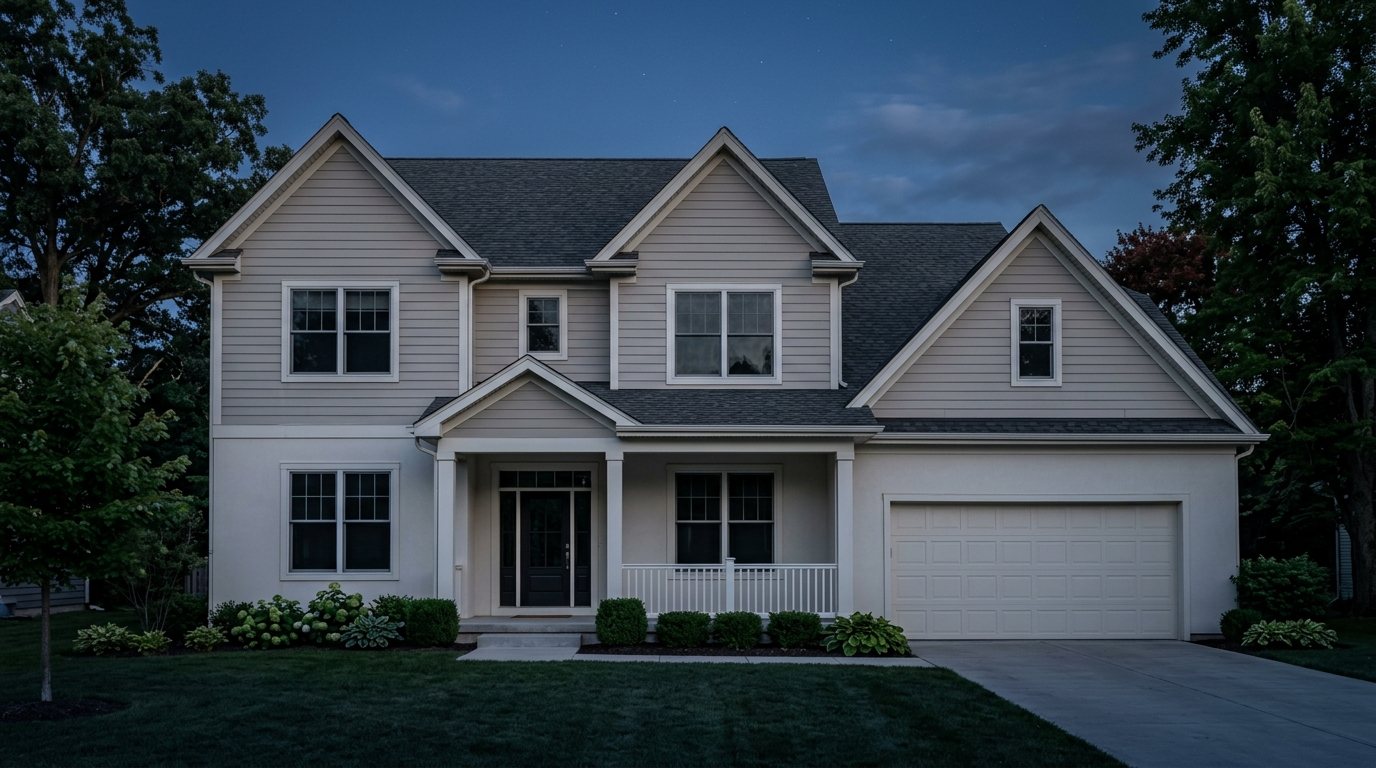
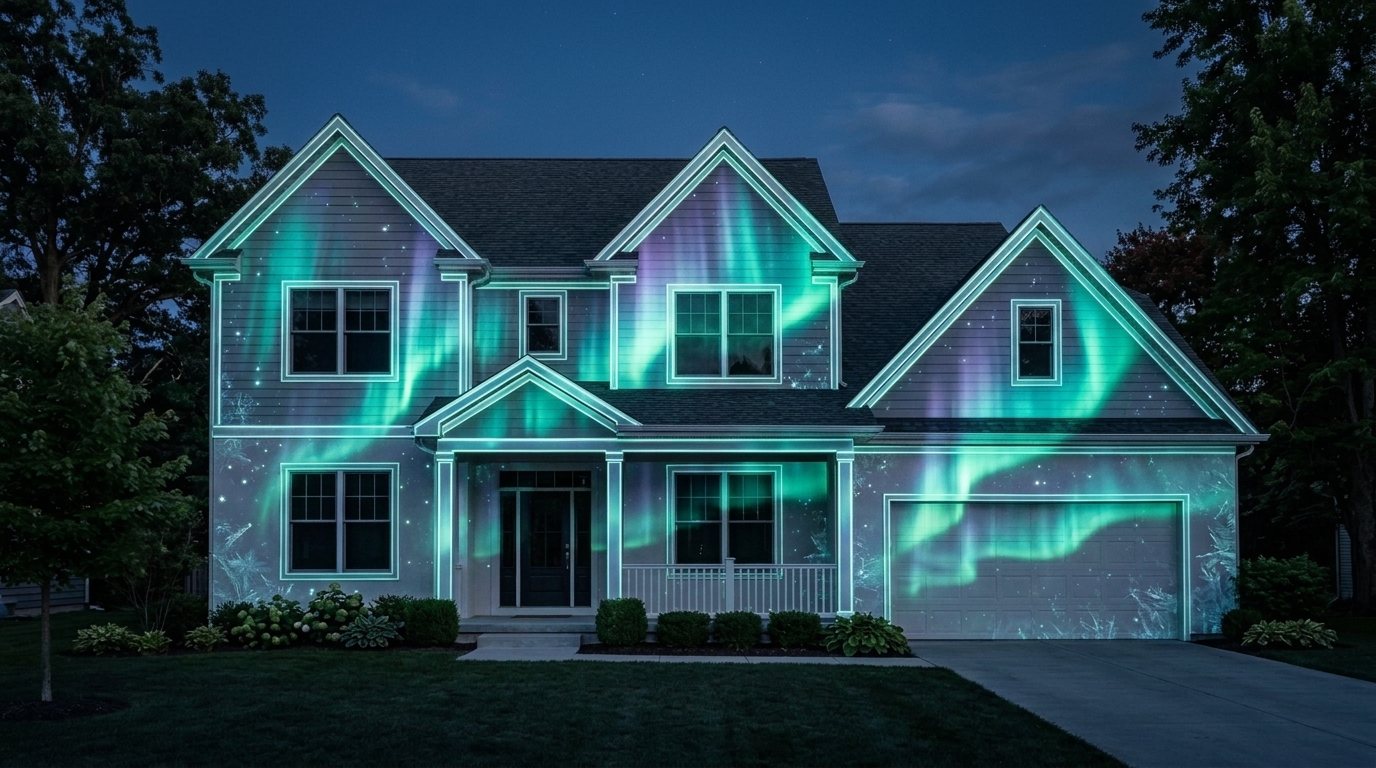
Unlit two-story suburban home at twilight before projection mapping Suburban home projection-mapped with Northern Lights and Frost theme Projected: Northern Lights & Frost Unlit House
Drag slider to compare · Notice glass windows stay cleanly dark
~35s
One-tap automatic house mapping
100%
Offline sunset-to-11 PM playback
7+
Instant effects & unlimited AI ideas
0
Design skills or roof ladders needed
How It Works

From unboxing to showtime in three easy steps.

Traditional projection mapping takes hours of manual tracing in complicated desktop software. HomeCanvas FX does the hard work automatically while you stay on your phone.

1

Plug in & scan the QR code

Connect your projector and USB webcam to a Raspberry Pi, Mac, or Windows PC. Launch HomeCanvas FX Edge — a crisp QR code appears on your house wall. Scan it with your phone to pair in seconds.

No complex networking or IP addresses
2

Aim & tap “Map My House”

Watch a live camera preview with a real-time sharpness meter on your phone while you aim and focus. Tap once and our 35-second auto-map learns every gable, pillar, garage door, and window frame.

Automatic AI window & wall recognition
3

Pick a theme & set sunset

Type any theme you dream up, tap an instant holiday effect, or upload your own photo or video. Turn on Automatic Sunset and your home lights up effortlessly every evening — even if Wi-Fi drops.

Control brightness & shows from your couch
Bring Your Own Hardware

No proprietary $1,500 lock-in box.

Use gear you already own — or pick up affordable off-the-shelf hardware from anywhere. Everything plugs together in five minutes.

Any HDMI Projector

1080p · 3,000+ lumens ideal

Already have a movie-night projector? It works! Place it inside a front window or in a simple weather-protected yard enclosure.

Any USB Webcam

Plug-and-play · ~$25

Point a standard USB webcam at your house right beside the projector. It acts as HomeCanvas FX’s eyes for live focus and 35-second auto-mapping.

Raspberry Pi, Mac, or PC

Small player · Free Edge app

Run silently on a $45 Raspberry Pi tucked by the projector, or start tonight using any Mac or Windows laptop you already have.

Raspberry Pi 1-line install: curl -fsSL https://homecanvasfx.com/install-pi.sh | bash
Designed for Homeowners

Everything that makes a show magical — built right in.

Thoughtful details engineered so your display looks professional on the street and feels effortless inside your home.

Custom AI Themes in Seconds

Describe anything — “Cozy Nordic ski chalet with warm golden window trim” or “Neon 80s birthday party” — and AI designs artwork tailored directly to your house’s real rooflines.

Smart Window Blackout

AI detects every window pane automatically and keeps glass dark by default — so your home dazzles the neighborhood without blinding anyone watching TV inside.

Living Motion Overlays & Effects

Layer gentle falling snow, twinkle lights, warm candle glow, or fireflies over any AI theme — or launch 7 instant holiday & ambient motion shows with zero AI credits.

Automatic Sunset Schedule

Calculates exact local sunset on your edge player and loops smooth 1080p shows until your chosen bedtime — 100% offline, even if outdoor Wi-Fi hiccups.

Phone-First Remote Control

Switch between saved shows, fine-tune projector brightness, flip an upside-down ceiling mount, or stop playback instantly from any mobile browser.

Upload Photos & MP4 Videos

Celebrating a birthday, graduation, or game day? Upload any photo or short MP4 straight from your phone and HomeCanvas FX wraps it cleanly onto your walls and garage.

Simple Plans

Start free tonight. Upgrade only when you want more.

Every account starts with generous monthly AI credits, unlimited instant effects, and full offline sunset scheduling — no credit card needed.

Early Access · Coming Soon

Home

Coming Soon

For enthusiasts who love rotating themes across every holiday & season.

  • ✓ 25 custom AI themes every month
  • ✓ 5 AI motion videos every month
  • ✓ Up to 3 paired projectors
  • ✓ Priority cloud show rendering
  • ✓ Everything included in Free
Start Free While in Beta
Early Access · Coming Soon

Pro

Coming Soon

Built for multi-projector estates, neighborhood showcases, and event pros.

  • ✓ 500 custom AI themes every month
  • ✓ 50 AI motion videos every month
  • ✓ Up to 10 paired projectors
  • ✓ Multi-house & commercial scale
  • ✓ Everything included in Home
Start Free While in Beta
Common Questions

Clear answers before you plug anything in.

Do I need any technical or projection-mapping experience?
Not at all. Once your projector and USB webcam are connected, HomeCanvas FX guides you step-by-step on your phone. Aiming uses a live camera view with a focus sharpness meter, and mapping your entire house takes a single tap and about 35 seconds.
Will the projector shine bright light into my windows?
No! HomeCanvas FX automatically identifies your windows during mapping and keeps glass panes dark by default. You can also toggle whether you want garage doors decorated with a single checkbox.
What happens if my outdoor Wi-Fi drops during a show?
Your show keeps playing smoothly without a glitch. Once a show is baked, your Raspberry Pi, Mac, or PC caches the 1080p video locally and calculates exact local sunset times offline — so nightly shows run reliably even with zero internet connection.
What kind of projector and camera work best?
Any standard 1080p HDMI projector works great (3,000+ lumens is ideal for bright, punchy colors on light siding or stucco). Pair it with any standard 1080p USB webcam pointed at the same wall. If you mount the projector upside down inside an enclosure, there is a one-tap “Flip Upside-Down” button right in the app.
Is this only for Christmas and Halloween?
Not even close! Use HomeCanvas FX all year long — Northern Lights winter washes, Fourth of July fireworks, cozy fall foliage, team colors on game day, birthday banners, or warm subtle architectural uplighting any night of the week.

Ready to light up the whole block?

Create your free HomeCanvas FX account, connect your projector in minutes, and transform your home tonight.